The adoption of bitcoin (BTC) as a savings tool and store of value is an established fact for millions of people. However, its use as a means of everyday payment still presents challenges. Seeking to close this gap, various solutions have emerged that act as bridges between the Bitcoin network and the traditional financial system. One of the most recent is the Dolphin Card, a rechargeable virtual card that is managed from the Aqua wallet, developed by the company JAN3. At BitcoinDynamic, we decided to put this new product to the test to evaluate its functionality, ease of use and convenience. Below, we chronicle our experience step by step, from initial setup to making an online purchase.
Getting started: easy setup and no KYC
The process begins with downloading the Aqua app, a bitcoin wallet available for Android or iOS mobile devices. As is the norm with self-custody wallets, the first essential step was to write down and securely store the 12-word recovery phrase. This element is essential, as it gives the user full control over their funds in the wallet. Subsequently, to access the card’s functionality, it is necessary to create an account in JAN3, a process that is carried out within the same application. One of the most notable aspects of this stage was the zero requirement for personal data. Only an email address was requested, without the need to go through a identity verification process (KYC) requiring documents or photographs. This approach, which values user privacy, allows anyone to register using an email created specifically for this purpose if they wish. Once the account was created, enabling the card – which is only available in virtual mode, at least for now – was a procedure of a few seconds. The application immediately displays the data necessary for any online purchase: the card number, expiration date and security code (CVV). It should be noted that It is an unnamed cardthat is, it does not have the name of the owner printed, a detail that we would test later.
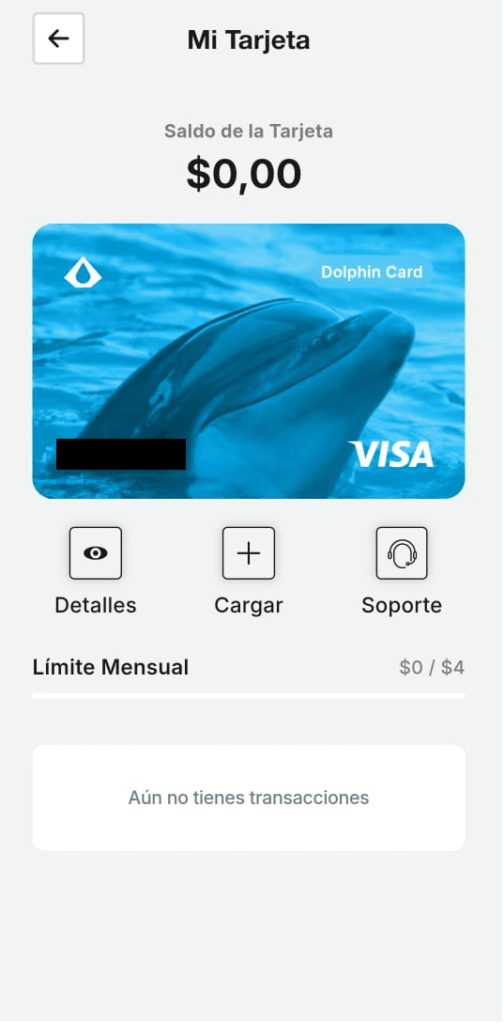
This is what the newly created Dolphin Card looks like, before loading the balance. Source: Screenshot by BitcoinDynamic of the Aqua app.
Reloading the card: a transaction on the Bitcoin network
With the virtual card already active, the next step was to load the balance. The method is direct and is done intuitively from the app, with balance coming from the Aqua wallet itself. In our first attempt, we wanted to load the equivalent of the 20 US dollars that we had in bitcoin in the wallet. However, the operation was not possible. The reason is simple: Recharging the card is an on-chain transaction. This means that, like any other transaction on the Bitcoin network, it requires a fee to be paid to the miners. By wanting to recharge it with the full amount, there were no sats left to make the payment of those commissions. Adjusting the amount, we proceeded to send the equivalent of 15 dollars in bitcoin. The transaction was sent to the network and here we observe another important point. The crediting of funds to the card was not instantaneous. We had to wait for the transaction to reach 3-4 confirmations on the network. While this adds a layer of security, accreditation after the first confirmation could significantly speed up the process for the user looking for immediacy.
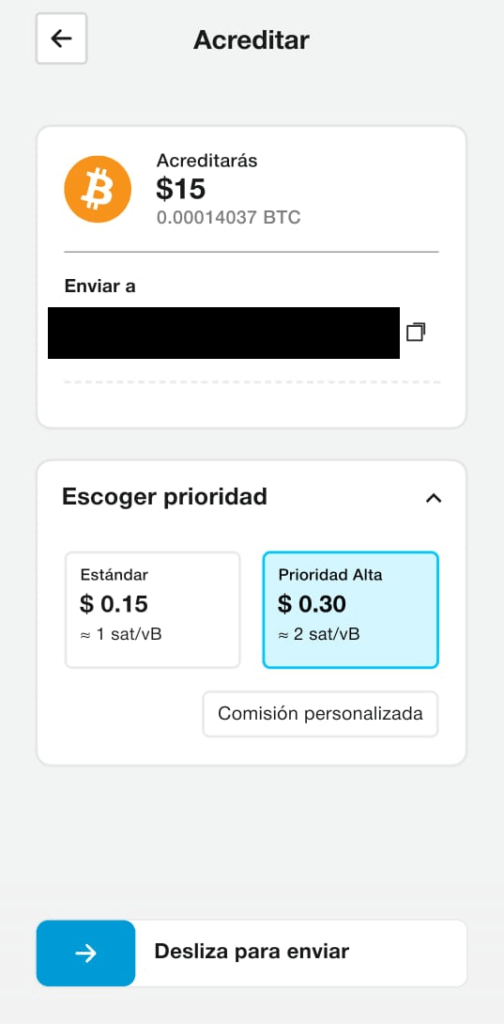
Reloading the card involves a transaction on the Bitcoin network. Source: Aqua Wallet – Screenshot by BitcoinDynamic. It is worth clarifying that the recharge It can also be done with the balances held in Liquid Bitcoin (L-BTC) and USDTboth on Liquid (a second layer network supported by Aqua that allows for faster and cheaper transactions than on the Bitcoin network). A central aspect of how the Dolphin Card works is that, once the funds are credited, Bitcoin balance is automatically converted to US dollars. At the moment, the platform does not offer the option to keep the balance in bitcoin, which could be a desirable feature for future developments, allowing users to decide in which asset to keep their balance (including the one they will use to make purchases with the Dolphin Card).
Testing the card
With a balance of $15 on the card, the moment of truth arrived: use it for a real payment. The first goal was a monthly Spotify subscription from Argentina. However, the streaming platform rejected the payment. The reason, reported by Spotify itself, was that the card did not correspond to the user’s country. Being a card issued in the United States and denominated in dollars, the Spotify system did not allow its use for a service located in Argentina (and for reasons of cost of the service in both countries, it was not convenient to change «residence» in Spotify). This is a factor to take into account for users in different jurisdictions, since many online services they could restrict payments to cards issued in the same billing country. Also, the user must evaluate the convenience according to the exchange rate. Far from giving up, we looked for another platform with global reach: Amazon.com. To conduct a low-dollar test, we set out to find a one-dollar product, like a digital book. The search led us to acquire a randomly selected literary work, “Words of the Heart, Book 8,” for the sole purpose of completing the test.

Our first purchase with the Dolphin Card. Source: BitcoinDynamic. When loading the payment information on Amazon, a question arose: the platform required a cardholder name, but the Dolphin Card is nameless. We opted to enter our own first and last name. To our surprise, The transaction was accepted without any problems..
The debit was instant. As soon as Amazon confirmed the purchase, the Dolphin Card’s dollar balance updated in the Aqua app, reflecting the discounted amount. The operation had been a success.
Conclusions: a positive experience with room for improvement
The experience with Aqua’s Dolphin Card was, in general terms, very positive. The card fulfilled its main purpose: allowing the spending of bitcoin to purchase products and services in stores that only accept traditional card payments. The ease of configuration and respect for user privacy are its strongest points. No critical failures were detected during use, but areas for improvement were identified that could enrich the experience. The possibility of funds being credited after the first confirmation of the Bitcoin network would significantly reduce waiting times. Likewise, offering the option to keep the balance in bitcoin would be a great addition for those users who prefer not to part with their digital asset until the last moment. Finally, the availability of physical cards in the future would greatly expand their usefulness, allowing their use in in-person stores and not only in the virtual sphere. In short, the Dolphin Card is presented as a functional and well-executed bridge between the Bitcoin network and the global payments ecosystemdemonstrating that the usability of digital currency in everyday life is becoming easier.